| Product | SKU | Stock | Status | Arrival date | Shipment | Updated |
|---|
| Shipment | Supplier | Reference | ETA | Status | Tracking | SKUs | Units | Still out of stock | Updated |
|---|
| Product | SKU | In stock now | Qty on shipment |
|---|
| Product | Publication | Score | Quote | Status |
|---|
Suggest a change to this screen
New @amp3uk reels that name a product we sell. Approve puts the reel on that product’s page, under the photos, with a “Follow @amp3uk on Instagram” button (within the hour). Skip leaves it off. Rumeysa approves; anyone can take a reel off a page again with Remove.
Waiting for Rumeysa
On product pages
Skipped and removed
Amazon listings the system has proposed: the Amazon product it matched (by barcode, or a suggestion you must check), what we'd offer and Amazon's own answer. Approve creates the offer on Amazon when creating is switched on (Systems tab), otherwise it waits there. Needs improvement with a note (e.g. the right ASIN) sends it back to Claude. Below, products the daily check found no Amazon listing for: Prepare asks the system to propose one. Listing issues are problems Amazon reports on listings we already have (an error can hide the listing from buyers): fix them on the listing's edit page in Seller Central, then press Fixed it: check again.
Waiting for approval
A+ rights by brand
New Amazon pages and A+
Products Amazon has no page for (for example a colour only we sell) get a full new page drafted from our website page; products whose Amazon pages have no A+ yet (where Amazon allows ours) get A+ content. Claude writes them and Amazon checks them. Edit anything, tick the items marked “Checked”, then Approve. Nothing goes to Amazon before that.
Stock fixes to approve
Listing issues on Amazon
Not yet on Amazon
Every product loop (the silent clip on product cards and over the first product photo) and every product film (“See it in action”). Watch each one, then Approve it, or mark it Needs improvement with a few words for Claude. A loop that needs improving can come off the site straight away; the product photo shows instead. New loops for products already on the site wait here, off the site, until they're approved.
Everything Claude prepares for a new product (photos, description, specs, search listing, loop and film) is checked here, part by part, before it goes live. Make new products as a Draft: nothing shows on the site until Publish, which appears once every part is approved.
New in Shopify since , not in the checks yet
Open-box and clearance listings are left out: they copy their main product.
New B-grade units that Claude has listed from Chris's master sheet. Nothing goes on the website until it's approved here. Check each unit's condition, price and photo (click the code to open it in Shopify), tick the ones that are right and press Approve ticked: the first unit of each stack goes on sale within 15 minutes and the rest wait their turn. If something is wrong, tick it and press Needs a change with a note for Claude.
Loading…
Changes Claude has prepared for product pages that are already on the site: a better description, corrected specs, more photos, a clearer search listing. Nothing changes on the site until you approve it. Compare On the site now with After approval, then Approve and publish, mark it Needs improvement with a note for Claude, or Keep the current page.
Loading the emails…
To-do email addresses (and the old Mechanic lists)
Add a to-do
Spotted something on the website, or anything at AMP3 that could work better (a process, a tool, the warehouse, customer service)? Suggest it here, with your name or anonymously, and add screenshots if they help. Josh and Mark review suggestions (with Claude's help, twice a day), and the ones to do are moved onto the To-do list.
Suggest an improvement
Beta Every product Chris has added in NetSuite this year that isn't live on the website yet, from NetSuite to Live. The list fills itself from NetSuite, Shopify, Stock arrival and Product checks; each value says where it comes from. Google, Amazon and eBay are coming next. Josh and Zach can add notes. Something wrong or missing? Use the Improvements tab, or reply to the launch email. Download CSV gives every item added this year, live ones too, with SKU, name, EAN and RRP in the first four columns; Table (in the Show list) shows the same list on screen.
Every open-box unit, where it is on sale, what has sold and what the open-box engine wants to do next. The engine reads our own sales and eBay's used prices every morning at 07:00 and makes small changes itself; bigger ones wait here for an OK from Joshua, Mark, Chris or Zach.
Needs your OK
Units
By model
What each model has sold for on each channel: how many, the average price as a share of the new price, the median days to sell and the estimated profit a sale (ex VAT, after fees and postage).
Switches
Off does nothing. Report records what the engine would do and changes nothing. Live makes the changes. One switch at a time.
Everything that runs by itself for AMP3, checked every 15 minutes. Click a box for what it does and what to do if it goes amber or red.
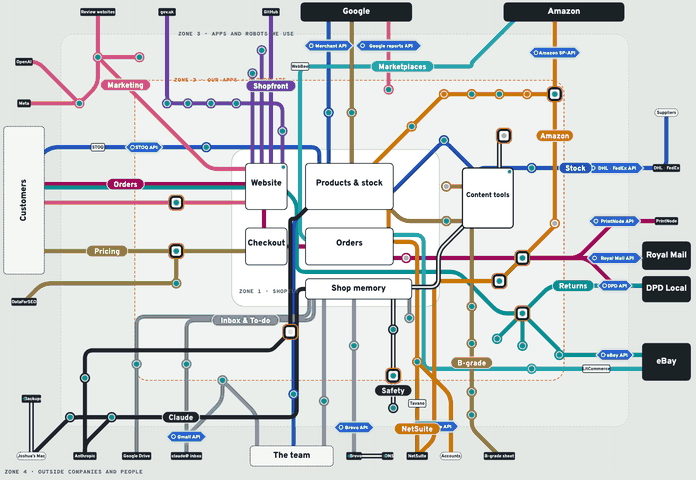 Systems mapHow every system, app and API connects, as an Underground-style board with a clock of when things run.Open the map ↗
Start here if something isn't working and Joshua isn't around
Settings website stock from NetSuite (Sync now), amp3 AI in working hours, Amazon listings and new-pages switches, delivery line on product pages
NetSuite fixes for Chris: differences NetSuite's own figures cause (shelf counts, negative stock, units NetSuite never had), as an inventory adjustment list with the reasons.
Bank holidays are added automatically from gov.uk. Closure days stop dispatch and delivery dates on the website, AMP3 Shipping's dates and the team's emails, and amp3 AI answers all day. With a Christmas last order date, the product pages, contact page and Help Centre show the Christmas dates and amp3 AI knows them; they stop by themselves after the last closure day. Changing the cut-off here changes the delivery line only: the Help Centre, basket note and T&Cs say "2pm" in words, so tell Claude to update them too.
Jobs what the scheduler ran, how long each job took, pause a job
Scheduler jobs
Every job the AMP3 scheduler runs, in the order it runs them: when it last ran, how long it took and what it reported. Pause stops a job at the next run (within 15 minutes) until someone resumes it here; the pause records who and why. A job that fails or times out shows red; its system card above goes red too if it stays that way.
Automatic emails every email our systems send, and who gets it
Automatic emails
One list of every email our systems send on their own: what it is for, when it goes and who gets it. Click an email for the details. Edit changes who gets it; the AMP3 scheduler reads the new list at its next run. Emails without an Edit button are sent by another app or go to customers: the details say where to change them. Days off says what the scheduler does with each team email on weekends, UK bank holidays and closure days: Sends (system alerts), Waits (sent at 08:00 on the next working day) or Skipped (the next working day's email covers it); change it with Edit.
Outside services we use companies and accounts, renewal dates
Outside services we use
The companies and accounts our systems rely on. Click one for what it connects to on our side, where to manage it, whose account it is and where its login is kept.
Handover checklist every login and key, and who else can get in
Handover checklist
Every login and key our systems need. The aim: each one saved in RoboForm (shared folder "AMP3 Systems"), and a second person who can get in without Joshua. Tick and type as you go; it saves straight away and records who changed it. Never type a password here.